Connect what you already have. Ghostly does the tracking.
-
Connect one mailbox and your show channels.
Point Ghostly at the events inbox, the Drive or SharePoint folder where kits live, and the Slack or Teams channel for each show. It reads only what you connect: one mailbox, one folder, the channels you link. Meeting transcripts from Zoom or Teams are optional.
-
Ghostly builds each show's record.
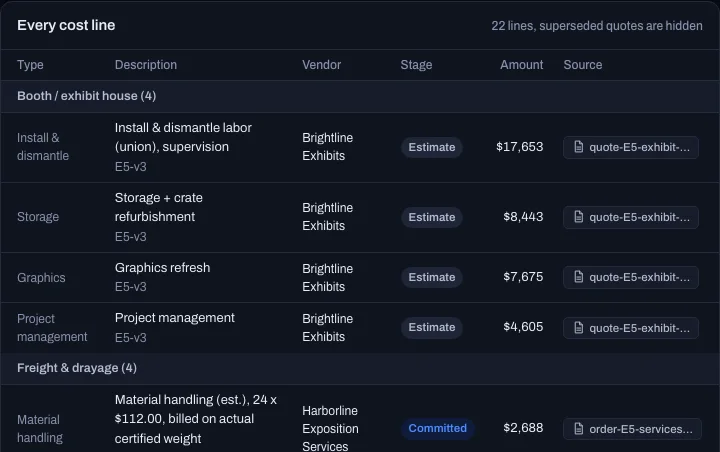
Deadlines with their penalties, quotes and invoices against budget, freight, tasks and who owns each one. It is all on one page per show, and every line links to the sentence it came from.
-
It nudges owners. A person approves anything that goes outside.
Owners get a direct message in Slack or Teams before a date slips. A CRM push, an email to an outsider or a post in a shared channel waits in an approval queue, with a preview of exactly what would be sent.
What is due, who owns it, and what missing it costs.
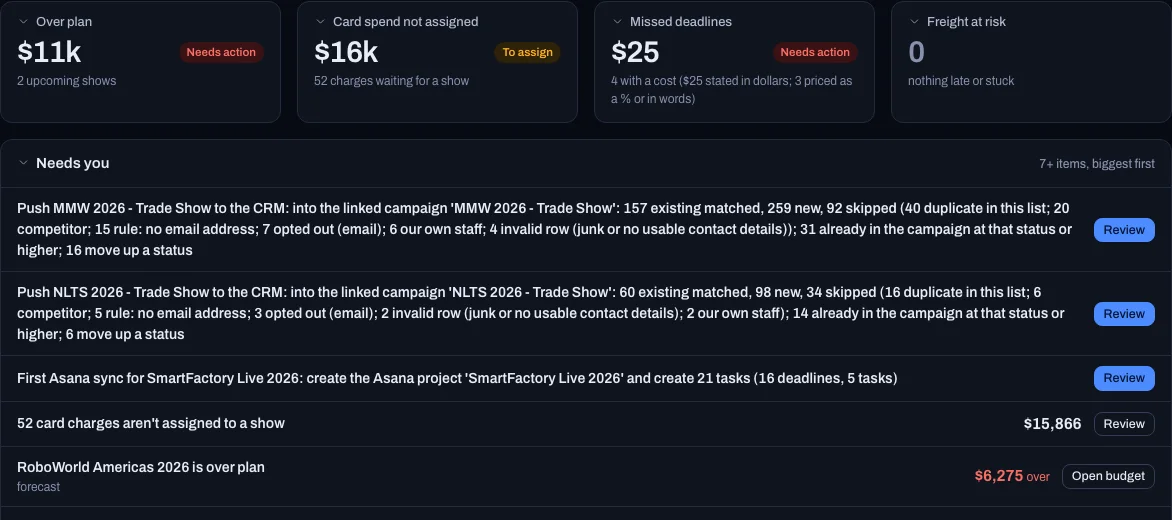
Exhibitor kits bury the dates that cost money: advance-order cutoffs, badge registration, insurance certificates, freight arrival windows. Ghostly puts each one on the show's record with its penalty, its owner and the document it came from.
- Penalties in dollars, not just datesThe Today page ranks what needs you by money at stake.
- The owner hears firstA direct message in Slack or Teams, before the date slips.
- Freight, tracked to the dockFedEx, UPS and LTL shipments checked until they land, with the risky ones flagged.
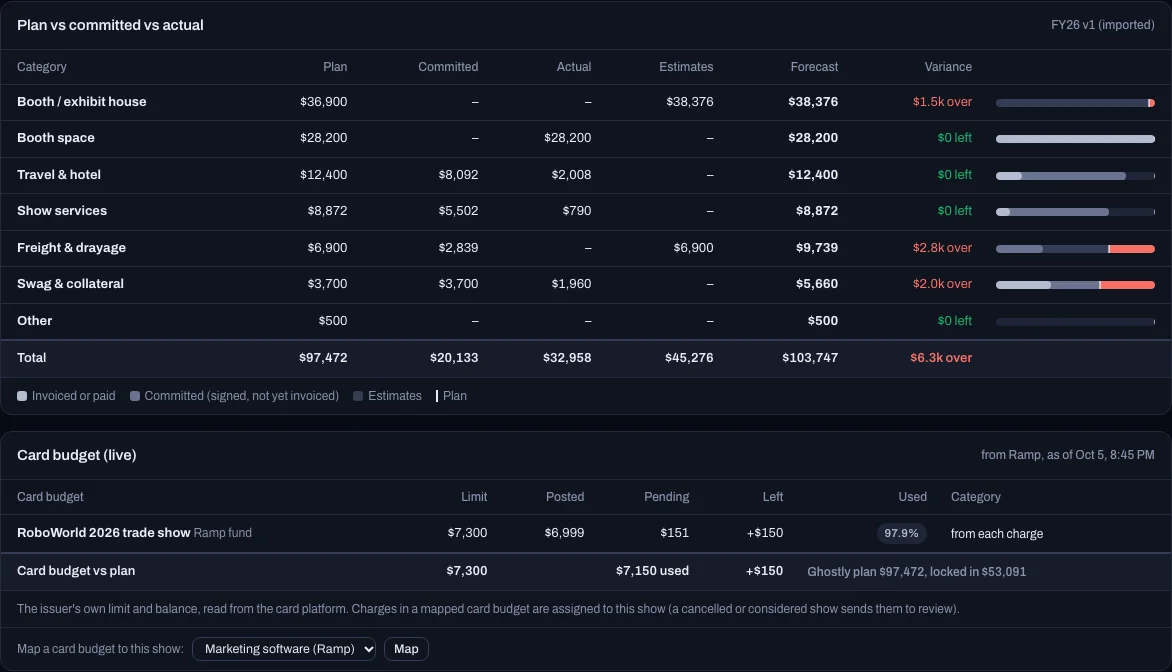
Budget against actuals, with the signed-but-not-invoiced money counted.
Ghostly builds each show's budget from your own spreadsheet, then matches quotes, invoices and card charges to it. Committed spend counts before the invoice lands, so an overrun shows up while you can still fix it.
- Plan, committed, actual and forecast, by categoryVariance for each show and for the whole program.
- Card budgets from Ramp and Brex beside the planLimit, used and left, read from the card platform.
- Bring the old spreadsheetImport it, check the totals, approve it as the plan.
What each show returned, read from your CRM.
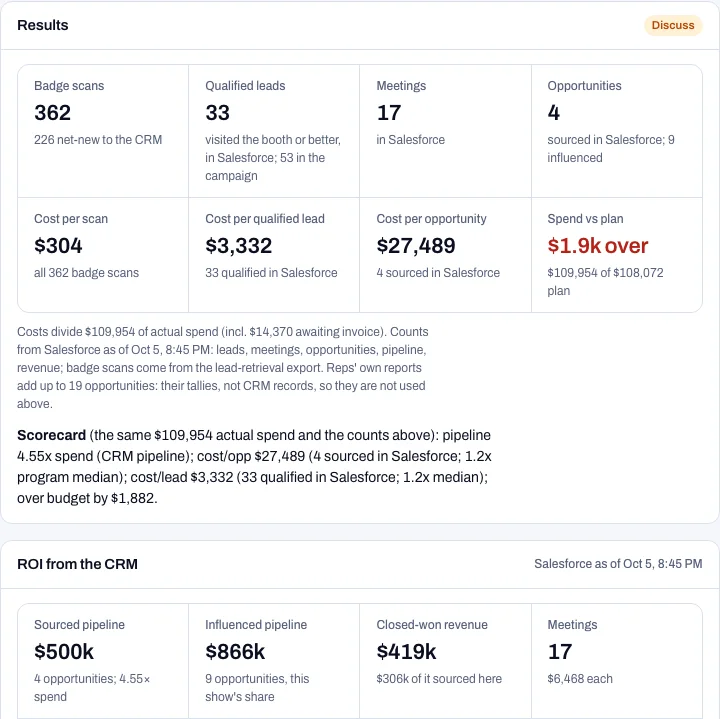
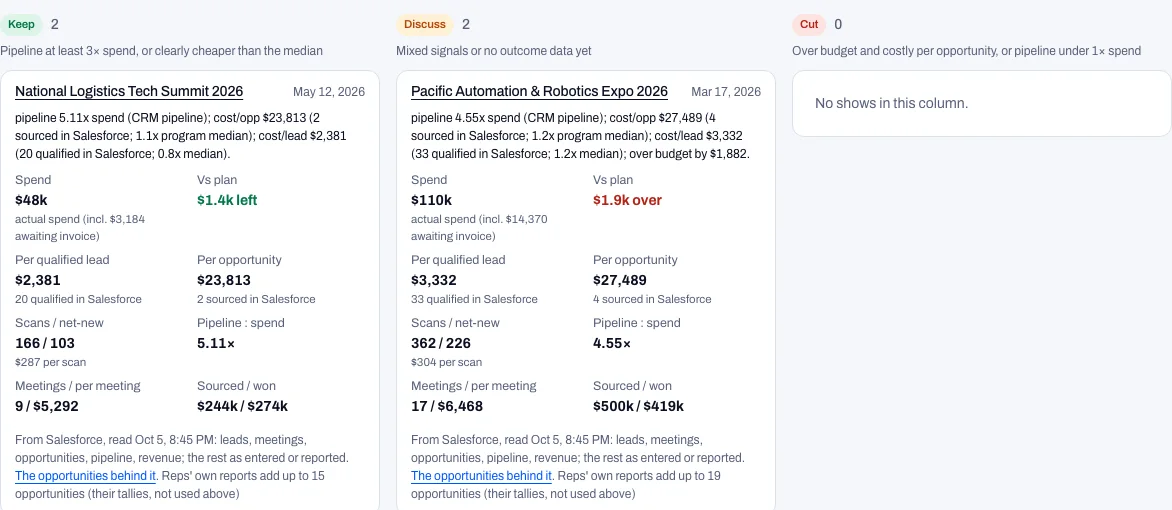
After the show, Ghostly pushes the scans to a Salesforce or HubSpot campaign once an approver says yes, then reads back the opportunities. Cost per qualified lead, cost per opportunity and sourced pipeline sit next to the spend, so the keep-or-cut call is made on numbers.
- Sourced and influenced pipelineThe opportunities behind each figure are listed, with why they count.
- Keep, discuss or cutFinished shows are scored against your own program's medians.
It works where the team already is.
- SlackShow channels, owner nudges, approvals
- Microsoft TeamsShow channels and task messages
- GoogleAn events Gmail inbox, a Drive folder
- Microsoft 365Outlook, SharePoint, OneDrive
- SalesforceCampaigns, members, pipeline
- HubSpotCampaigns, contacts, deals
- RampCard spend and card budgets by show
- BrexCard spend and card budgets by show
Ghostly also reads Zoom and Teams meeting transcripts and tracks FedEx, UPS and LTL freight. The connectors are built against each vendor's published API and tested on mock services. Design partners are the first live connections.
Nothing leaves the company until a person says so.
Safe mode is the default. Ghostly proposes, and an approver with the right to approve decides. The rule is enforced in the database, not just the interface: Ghostly cannot approve its own actions, and neither can an API key or an AI assistant.
- Held for approval
- Pushing a campaign or leads into your CRM
- Email to anyone outside the company
- Posts in shared channels, such as Slack Connect
- Sent right away
- Reminders and task messages to your own teammates. Nudging your own team is the product working. Anything aimed outside the company is held.
Every fact links to where it came from.
Each deadline, cost line and task carries a source chip that opens the email, quote, transcript or message behind it. For Slack and Teams, Ghostly keeps a short paraphrase and a permalink, never the message text.